Downconvert  SketchUp  files from newer versions to older ones

Drag & Drop

SketchUp Files (.skp)

— OR —

Choose the version you want to convert your file to

By using this service, you accept our terms of use and our privacy policy.

Ultra Fast

Instant conversion of your SketchUp files in seconds.

100% Secure

Your files are protected and automatically deleted after conversion.

Quality Preserved

All your textures, components and layers are kept intact.

Everything You Need to Know

All the information about converting your SketchUp files

Convert SketchUp Files to Older Versions

DownConvert SketchUp Files is a professional online tool that allows you to downconvert SketchUp (.skp) files to older SketchUp versions, from SketchUp 2017 to SketchUp 2026. This tool solves one of the most common SketchUp problems: version incompatibility.

If you have ever seen the message "This file was created with a newer version of SketchUp", this tool is designed for you. Fast, secure, and easy to use.

What is a SketchUp SKP file?

A file with the .skp extension is a SketchUp model file. It contains 3D geometry, materials, textures, components, groups, scenes, and metadata used in architecture, interior design, urban planning, product design, and 3D visualization.

SketchUp files are not backward compatible, which means that older versions of SketchUp cannot open files created in newer versions.

Why SketchUp version compatibility is a problem

SketchUp evolves every year. Each new version may introduce new geometry handling, updated materials and rendering pipelines, new metadata or scene features, and internal file format changes. Because of this, older SketchUp versions do not recognize newer SKP formats.

This creates real-world issues where clients using older SketchUp licenses cannot open your files, schools and training centers stay on legacy versions, long-term projects span multiple SketchUp generations, and teams collaborate across different software environments. Downconverting SketchUp files is the only way to restore compatibility.

What does "downconvert a SketchUp file" mean?

Downconverting a SketchUp file means converting a newer SKP file into an older SketchUp format, so it can be opened in earlier versions of the software. For example, you can convert SketchUp 2025 to SketchUp 2017, SketchUp 2024 to SketchUp 2019, or SketchUp 2023 to SketchUp 2020.

This process keeps your model usable in older environments.

How to downconvert a SketchUp file

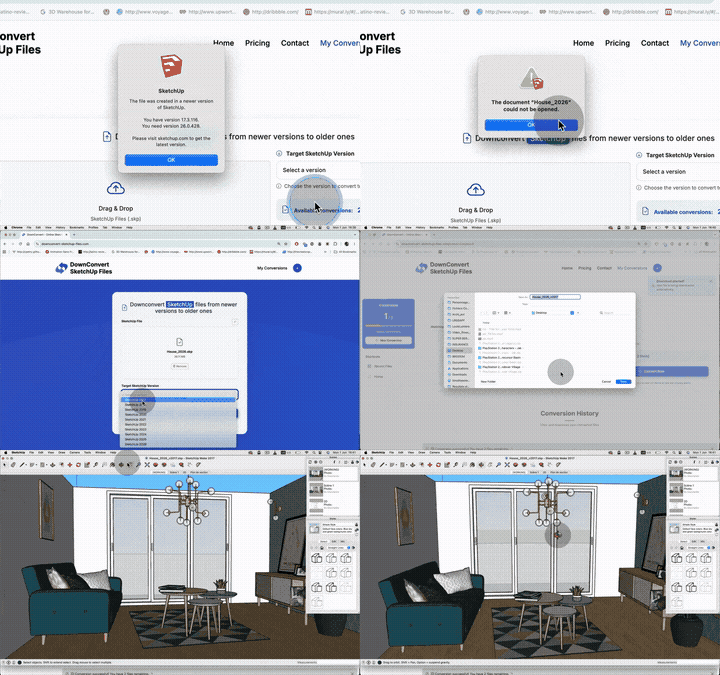
DownConvert SketchUp Files makes the process extremely simple. Click the upload button, select your .skp file, choose the target SketchUp version, let the tool convert your file automatically, and download the converted file instantly.

You can also drag and drop your SketchUp files directly into the upload area.

Supported SketchUp Versions

This tool supports downconversion to the following versions:

SketchUp 2017
SketchUp 2018
SketchUp 2019
SketchUp 2020
SketchUp 2021
SketchUp 2022
SketchUp 2023
SketchUp 2024
SketchUp 2025
SketchUp 2026

This wide range ensures compatibility with legacy workflows and modern pipelines.

Why should you convert your SketchUp files?

There are many reasons to downconvert SketchUp files. Older versions of SketchUp cannot open newer SKP files without conversion. Not everyone upgrades SketchUp every year, so downconversion ensures smooth collaboration with clients and teams.

Many educational environments remain on older SketchUp versions for stability. Old projects often require opening files in their original software environment, and some 3D tools rely on older SketchUp formats for import.

How does the pricing work?

DownConvert SketchUp Files uses a simple pay-per-conversion model. You purchase conversion credits (files) that never expire. Each conversion costs 1 file credit, and you can buy packages of 1, 5, or 20 files depending on your needs.

Volume discounts available: The more files you purchase at once, the more you save per conversion. Your purchased conversions never expire, so you can use them whenever you need.

What file size limits apply?

Each SketchUp file can be up to 100 MB in size. This covers the vast majority of SketchUp projects, including complex architectural models and detailed interior designs.

Will downconversion affect my SketchUp model?

Downconversion preserves geometry, groups and components, materials and textures, scenes and camera views. However, features introduced in newer SketchUp versions may be simplified or removed if they are not supported in the target version.

This is a technical limitation of SketchUp itself, not our conversion tool.

Will textures and materials be preserved?

Yes, textures and materials are preserved whenever possible. If a newer material system is not supported in an older version, SketchUp automatically adapts it to the closest compatible format.

Can I downconvert SketchUp files without SketchUp installed?

Yes. This is a fully online SketchUp version converter. You do not need SketchUp installed, a SketchUp license, or a powerful computer. All processing happens securely on our servers.

Does this tool work on Mac and Windows?

Yes. DownConvert SketchUp Files works on macOS, Windows, and Linux. All you need is a modern web browser and an internet connection.

Is it safe to convert SketchUp files online?

Yes, it is completely safe. Your original files remain untouched, files are processed automatically with enterprise-grade security, there is no manual access to your data, and all uploaded and converted files are automatically deleted after 7 days.

Privacy first: Your files are encrypted during transfer and storage. We do not share your data with third parties, and all files are permanently deleted after the retention period.

Who is this tool for?

This tool is ideal for architects, interior designers, urban planners, 3D artists, students and teachers, freelancers and agencies, construction companies, and anyone working with SketchUp files across different versions.

Why use an online SketchUp downconverter?

Using SketchUp itself to save older versions is not always possible. You may not have access to the original software, you may receive files from clients, or you may need a quick, reliable conversion without installing additional software.

An online tool is faster, more accessible, and works from any device.

Common SketchUp error messages explained

If you see "This file was created with a newer version of SketchUp" or "Unsupported SketchUp file version", both errors indicate a version mismatch, which our downconversion service solves instantly.

How long are my converted files stored?

Converted files are stored securely for 7 days after conversion. During this time, you can download them as many times as you need. After 7 days, files are automatically and permanently deleted for your privacy.

Can I use converted files commercially?

Yes. You can use converted SketchUp files for commercial, professional, educational, and personal projects without any restrictions.

What if I need more conversions?

You can purchase additional conversion credits anytime. Choose from our flexible packages: 1 file for quick one-time needs, 5 files for regular users (best value), or 20 files for professionals and teams.

Do my purchased conversions expire?

No. Your purchased file conversions never expire. Buy once and use them whenever you need, whether that's tomorrow or next year.

Is this tool affiliated with SketchUp?

No. DownConvert SketchUp Files is an independent professional service and is not affiliated with, endorsed by, or sponsored by SketchUp or Trimble Inc.

Ready to convert? Stop wasting time with version incompatibility issues. Purchase your conversion credits and get your SketchUp files converted to older versions instantly.

Simple & Transparent Pricing

Pay only for what you need - no subscriptions

1 FILE

For a quick one-time conversion

$4.99 / file

Buy Now

Secure payment by Stripe

  • 1 SketchUp conversion
  • No expiration
  • Files up to 100 MB
  • All SketchUp versions
  • Email support
  • Bulk discount
  • Priority support

20 FILES

For professionals - Save $60!

$39.99 / 20 files

Only $2.00 per file (-60%)

Buy Now
  • 20 SketchUp conversions
  • Save $60.00 (-60%)
  • Perfect for professionals
  • No expiration
  • 24/7 priority support
  • Complete history